
One Software Engineer to Another: Moving Past the Fear and Into the AI Era
For anyone who has dedicated their life to the craft of coding, software engineering is more than just a job—it’s a deep passion. Over the course of my career, I have fallen in love with the sheer beauty of language design. I’ve explored everything from Assembly, Basic, Quick Basic, Visual Basic, to the era of C, C++, Visual C++ and then Prolog to Java, JavaScript, VBScript, and Python. There is a distinct, satisfying joy in thinking through individual lines of code, perfecting structure, and implementing elegant design patterns. It has been a central pillar of my life.
So, I’ll be honest: when advanced generative AI tools first emerged, my initial reaction wasn't excitement. It was fear.
The Initial Shock and Sadness
I remember looking at what these tools could do and feeling an extraordinary sense of fright and a profound sadness. I faced a heavy wave of internal worry, looking inward and asking: What does this mean for me as a software engineer? What does it mean that an AI can write code faster—and, with the right prompting, probably better—than I ever could on my own?
It felt like the thing I cared about most was being automated away. If you are feeling that exact same worry right now, I want you to know that your feelings are completely valid. But I also want to tell you that there is another side to that fear.
The Shift to Creative Freedom
Today, I can confidently say I have transitioned to the other side. In fact, I have never felt more joy, more creativity, or had more pure fun building software than I do right now.
The turning point for me came when I started working with advanced developer tools, specifically Claude Code. I began stepping back from micro-managing individual lines of code and started experimenting with massive, high-level prompts—asking the AI to build entire applications or fully realized features from scratch.
Approaching software engineering from this macro perspective transformed everything. Suddenly, I stopped getting bogged down by the minutia that usually drains a developer’s energy. The endless debugging, the frustration of managing library version mismatches, and the tedious cleanup of my own minor syntax mistakes simply evaporated.
Instead of fighting the codebase, I was freed up to think about what truly matters: How do I actually solve this problem? How do I build an application that is genuinely exciting and innovative?
From 10x to 1,000x Velocity
By letting go of the keyboard shortcuts and manual typing, I unlocked a far higher rate of velocity and a significantly higher level of quality. Every developer has a mental backlog of ideas—the things where you say, "That would be awesome to do, but I just don't have the time because I’m still struggling to finish this one minor feature."
All of those limitations have disappeared. Now, as fast as I can dream up amazing concepts, I can build them.
You might wonder, as I did: Am I going to be unhappy if I’m not manually typing out individual lines of code? For me, the answer is an absolute, resounding no. The shift has made this the most inspiring and invigorating period of my career.
I distinctly remember the moment my perspective flipped forever. I gave Claude Code what I call a "1,000x prompt"—a massive, complex instruction—and it executed something so flawlessly that it literally took my breath away. That was the moment I realized we are living through a historic pivot point. AI agents have transformed software engineering into something profoundly impactful and thrilling for the future.
The New Role of the Engineer
In this new era, your value as a software engineer hasn't decreased; it has shifted. The most critical skills you possess are no longer your typing speed or your ability to remember obscure syntax. Your value now lies in your creativity, your critical thinking, your deep knowledge of system architecture, and your vision for how to elegantly piece complex components together.
So, if you are looking at the rapid rise of AI and feeling worried about your place in the tech landscape, hang in there. Don’t look at these tools as your replacement; look at them as the ultimate force multiplier.
Once you embrace this shift, you won't feel obsolete. You will feel like an incredible innovator, a powerful leader, and a visionary who is more equipped than ever to solve the world's problems through the power of computing.
AI Labor: Claude Code is Your New AI Development Team
Hopefully, by now, you have gone off and tried one of those massive, ambitious prompts—perhaps asking an AI to build an entire application from scratch—and been absolutely stunned by what Claude Code is capable of.
But let’s take a step back. Why are these massive prompts so important, and why do we need to completely shift how we think about prompting? To answer that, we need a mental model that will guide how we approach AI moving forward.
That model is simple: AI is labor.
From Copy-Paste to Autonomy: The Evolution of AI Labor
When we say AI is labor, we specifically mean software engineering labor. When you use advanced AI agents like Claude Code, they are going to work on your behalf.
In the early days of the generative AI revolution, we accessed this labor in tiny, micromanaged chunks:
We gave it a prompt and got a block of text back.
We copied a function and manually pasted it into a Python Script file.
We acted as the delivery mechanism for the AI's work.
Over time, that dynamic changed. AI began directly injecting its work into our files. Today, we can extract massive amounts of labor from an AI at a single time.
The power of an advanced agent like Claude Code comes from treating it as an autonomous entity that can execute tasks on your behalf at a much larger scale. We need to move away from the model of a boss constantly looking over an employee's shoulder. Instead, you need to become a leader. You have an entire team working for you, and your job is to delegate effectively.
The Bottleneck is Your Prompt
If you do not think through how you are deploying AI labor, you will quickly become the bottleneck. You won't be able to scale its output, and you won't be able to run tasks in parallel. The ultimate starting point for solving this is your prompt.
| Leadership Style | Prompting Approach | Result |
| The Micromanager | Focuses on individual functions and granular steps. | One highly restricted, single-task coworker. |
| The AI Leader | Focuses on vision, high-level challenges, and broad scope. | Hundreds or thousands of parallel coworkers executing a vision. |
To unlock the true power of Claude Code, you must provide your vision, not micromanage the implementation.
How an AI Leader Prompts
An AI leader doesn't give step-by-step instructions. They challenge the AI. They assign big tasks and demand massive, 1000x improvements.
Look at these real-world examples of macro-prompting:
Challenging the Design:
"Look at this list of expenses. How could we make it incredibly bold, beautiful, and modern? Blow my mind with the elegance, simplicity, and beauty of your user interface."
Enforcing Global Consistency:
"The user interface isn't consistent. Could you make everything match the style of the list of expenses?"
(Instead of fixing individual components, you tell the AI to look at the master style and figure out how to apply it everywhere autonomously.)
Solving the Problem, Not Just Writing Code:
"When I'm trying to prepare my small businesses' taxes, I find it really hard to gather all of the relevant expenses. Create something amazing to solve that problem for me."
With this final prompt, you aren't asking for an isolated function. You are tasking your AI labor to solve a complex, contextual human problem.
Scale Your Vision with Claude Code
Moving forward, we are going to explore how to effectively task AI labor with complex software engineering. We will cover:
The unique challenges encountered when integrating AI labor into software processes.
How to scale your use of AI labor in parallel.
The specific architectural and workflow concerns that arise when working with Claude Code.
Remember: you are no longer just interacting with a simple chat interface. Claude Code is an AI agent. It is your AI labor. If you use it correctly, it is a team of 100 or 1,000 developers ready to scale up and carry out your vision. Stop coding line by line, and start leading.
The "Best of N" Pattern: Leveraging AI Labor Cost Advantages
There is a widespread belief in the tech industry that AI-generated code is inherently low quality, riddle-filled, and plagued with security vulnerabilities. This perspective completely misses the point.
While code quality requires close attention, the output depends heavily on how you prompt and the architectural workflows you design. By shifting your perspective, you can leverage AI not just to write code faster, but to design higher-quality software than ever before.
The secret lies in shifting from a linear development mindset to the "Best of N" pattern—using scalable, low-cost AI labor to explore massive design spaces simultaneously.
The Reality of AI Labor: Fast, Cheap, and Egoless
In traditional software development, exploring multiple design paths is extraordinarily expensive. If a human team spends a week building out a complex reporting dashboard, you cannot easily tell them: "Hey, that’s great, but let’s throw it all away and try a completely different, gamified approach just to see what happens." It would destroy team morale, take too long, and cost thousands of dollars.
AI labor changes this dynamic entirely because it possesses three unique traits:
Speed: Complex feature sets can be generated in minutes.
Low Cost: A task that would cost thousands of dollars in human labor costs pennies—or at most a few dollars—in LLM tokens.
Egoless Exploration: AI doesn't experience burnout, get defensive about its code, or feel frustrated when you tell it to delete everything and start over.
Because AI labor is functionally disposable, variability becomes a massive asset. You can deliberately push the AI to build the same feature multiple different ways just to see what is possible.
How the "Best of N" Pattern Works
Instead of tasking an AI assistant to solve a problem once and moving on, the "Best of N" pattern treats software engineering as a search problem.
                          ┌──► Alternative A: Dashboard & Filters
                          │
[Prior Code Branch] ──────┼──► Alternative B: AI Insights & Gamification
                          │
                          └──► Alternative C: Social Features & Anomaly Detection
                                      │
                                      ▼
                        [Human Review & Rubric Evaluation]
                                      │
                                      ▼
                        [Final Merged/Cherry-Picked Production Code]
1. Branch and Diverge
When faced with a major feature request (e.g., adding filtering and reporting to an expense app), don't just accept the first working version. Check out the prior stable branch and ask the AI to repeat the process using a radically different philosophy.
Example Prompt: "That first implementation was great. Now, go back to the prior branch and solve the underlying problem in a completely different and wildly valuable way. Surprise me with your creativity."
2. Evaluate and Experiment
The AI might return with unexpected ideas—such as AI-powered anomaly detection, gamification, or social sharing elements. As the human architect, you get to interact with, experience, and test multiple living prototypes of the same product side by side.
3. Cherry-Pick and Merge
You don't have to choose just one branch. If Version B has an incredible anomaly detection system, but Version A has a superior UI layout, you can task the AI to cherry-pick the best components from both branches and merge them into a definitive production version.
The Evolving Role of the Human Engineer
Adopting this pattern requires stepping back to a macro level. You are no longer just a line-by-line coder; you are an architect, a judge, and a director of AI search parties.
To scale this pattern effectively, you can introduce an automated evaluation step:
| Step | Action | Responsibility |
| 1. Deploy | Spin up AI teams to build 3, 5, or 10 variations of a feature. | AI |
| 2. Filter | Feed the AI a strict rubric to pre-evaluate and narrow down the best options. | AI + Human Criteria |
| 3. Judge | Critically analyze the top 3 solutions for business value and design elegance. | Human |
| 4. Synthesize | Guide the integration of the best elements into the final codebase. | Human |
By deploying AI labor to run these "search parties," you conquer the hardest problem in software engineering: discovering and building the right thing.
Moving Forward
Stop asking your AI tools to solve a problem once. Build systems where they solve it ten times, evaluate the variations against your standards, and use the power of infinite, cheap iteration to unlock true software innovation.
Exercise: Build Multiple Versions of a Feature with Best of N
Prerequisites
Before starting this exercise, ensure you have
(1) Read the article https://www.fouadsabry.com/blog/artificial-intelligence-blog-1/getting-started-with-claude-code-3
(2) Completed the initial setup of the Next.js expense tracking app.
(3) Possess a foundational understanding of working with Git branches.
(4) Make sure you have Claude Code fully installed and operational within your active expense tracker project directory.
Tip: If you need a refresher on version control, you can ask Claude: "Teach me about Git branches. Let's do it interactively. Don't create an artifact. Explain things using concrete examples with example repositories with a handful of files."
Part 1: Understanding the Best-of-N Pattern
What is Best-of-N?
The Best-of-N pattern takes advantage of the unique economic reality of AI labor: it is incredibly rapid, highly cost-effective, and entirely egoless. When working with human developers, asking them to delete hours of hard work to try a completely different approach causes frustration. Claude, however, will gladly rewrite code from scratch without a second thought.
Traditional Development Workflow:
Build a single implementation.
Stick with that initial solution because rewriting it is too expensive.
Hope it turns out to be the best architectural path.
AI Labor Development Workflow:
Generate 3 to 5 entirely different solutions.
Compare, contrast, and evaluate every approach.
Pick the absolute best version or cherry-pick elements to combine them.
Total time: Still faster than writing a single implementation traditionally.
Why This Works
AI is rapid: Complex software engineering tasks that take human teams days to build can be generated by AI in mere minutes.
AI is cost-effective: Even when factoring in premium AI subscriptions or heavy token consumption, the cost is a tiny fraction of a developer's hourly wage.
AI is creative: By modifying your instructions, each attempt can explore radically unique user experiences and architectural designs.
AI is egoless: The model has no pride of ownership; you can discard its output guilt-free if a different direction works better.
Part 2: Setting Up for Multiple Implementations
Step 1: Prepare Your Repository
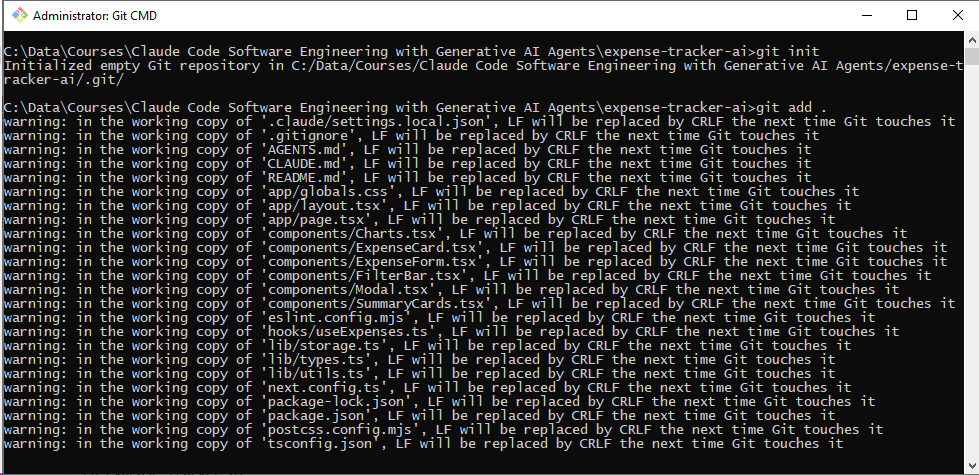
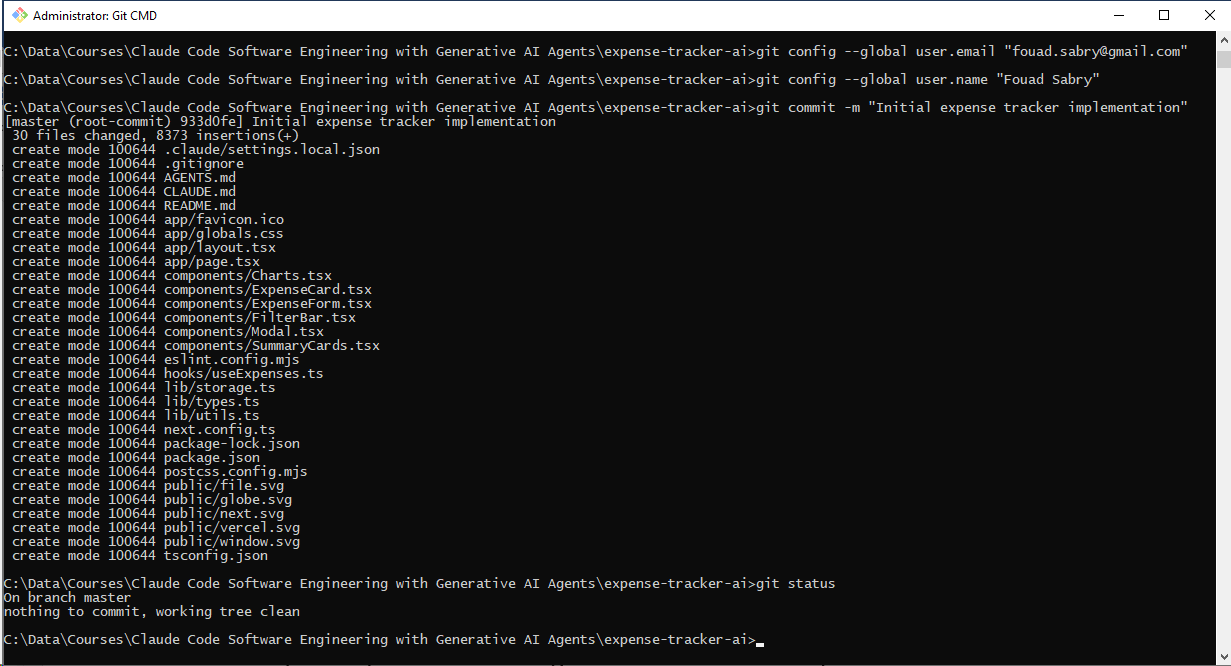
Ensure your current codebase is clean, saved, and fully committed before starting the exercise:
Bash
cd expense-tracker-ai
git init
git add .
git config --global user.email "fouad.sabry@gmail.com"
git config --global user.name "Fouad Sabry"
git commit -m "Initial expense tracker implementation"
git status
Step 2: Launch Claude Code
Start the interactive AI coding environment:
Bash
claude
Part 3: Implementing Version 1 - Simple CSV Export
The Feature Request
To explore the Best-of-N pattern, we will build a data export feature using three entirely distinct philosophies. We will begin with a bare-bones implementation.
Prompt for Version 1
Plaintext
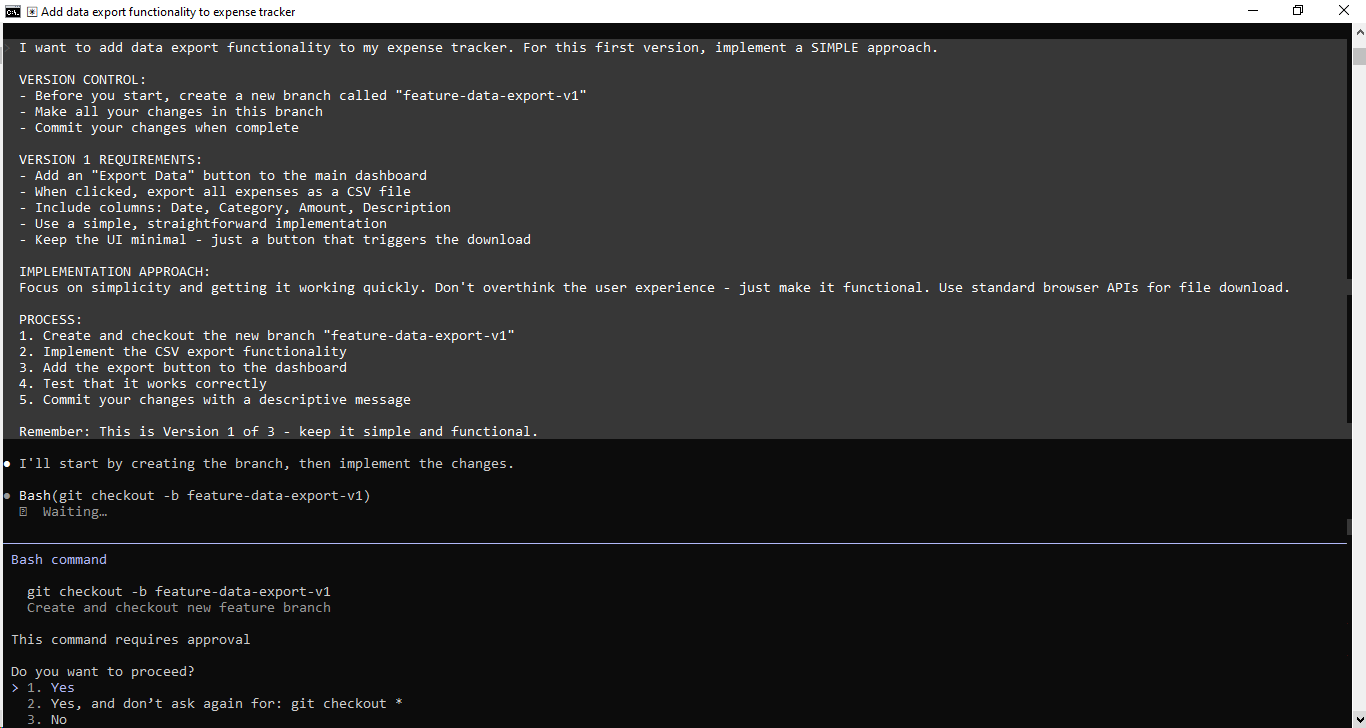
I am looking to integrate a data export feature into my expense tracking application. For this initial iteration, I want to focus on a highly straightforward, basic setup.

VERSION CONTROL:
- Prior to writing any code, spin up a new local branch named "feature-data-export-v1".
- Restrict all modifications and file additions to this specific branch.
- Securely commit your codebase updates once everything is functional.

VERSION 1 REQUIREMENTS:
- Place a clean, unadorned "Export Data" button directly onto the primary user dashboard.
- Trigger an automatic download of a compiled CSV spreadsheet containing all logged expenses upon clicking.
- Map the data structure to include exactly four headers: Date, Category, Amount, and Description.
- Rely on a clean, uncomplicated coding method.
- Maintain a completely streamlined interface—avoid complex elements, sticking only to a functional action button.

IMPLEMENTATION APPROACH:
Prioritize raw utility, execution speed, and functional stability above all else. Avoid complicating the interface design or user journey; it just needs to operate correctly. Use native client-side browser capabilities to manage the file download cycle.

PROCESS:
1. Initialize and switch your workspace over to the new "feature-data-export-v1" branch.
2. Build out the logic required to parse and format the data rows into standard CSV text.
3. Embed the download action button seamlessly into the existing dashboard UI component.
4. Run validation checks to ensure the generated file triggers and downloads without errors.
5. Conclude by saving your work to the branch using a clear, informative commit log.

Keep in mind: This marks the first version of a three-part design experiment—keep the footprint minimal, practical, and clean.
What to Observe
As the AI processes Version 1, keep an eye on:
The exact Git commands it uses to isolate its workspace.
Its programmatic choices (such as relying on native client-side browser APIs).
How clean and minimal it keeps the code layout.
Where it decides to place the user interface elements.
The way it parses and structures the raw data into CSV format.
Test Version 1
Once the AI finishes the task:
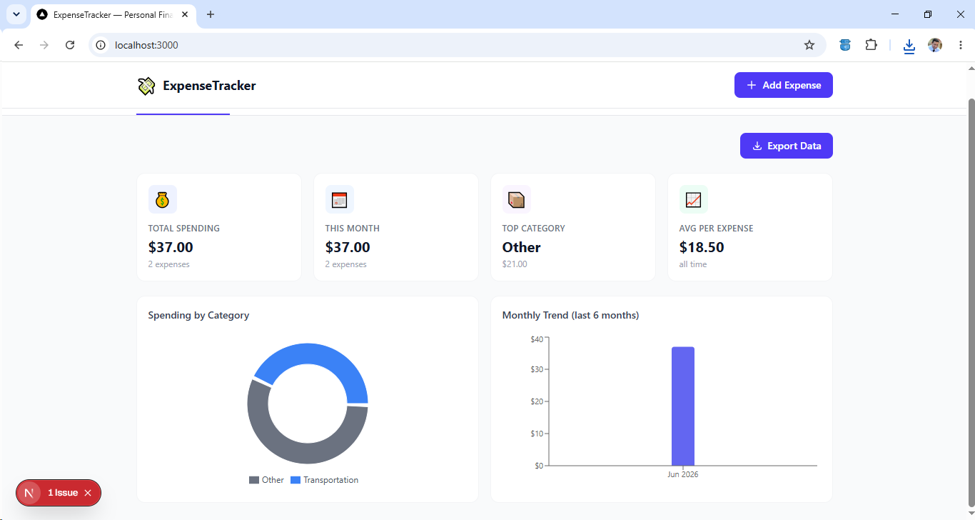
Boot up your local development environment using:
npm run dev.
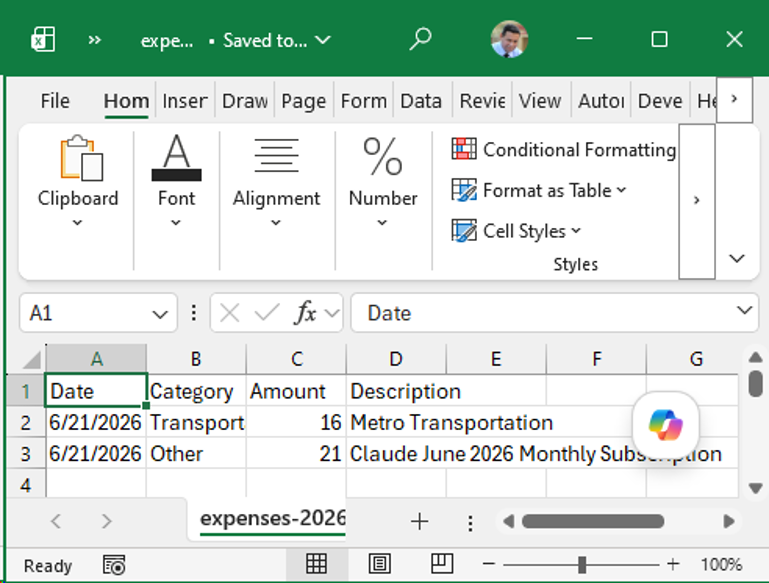
Populate the app with a few sample expenses.
Click your new export button.
Open the downloaded CSV file to confirm the data structured correctly.
Part 4: Implementing Version 2 - Advanced Export with Options
Reset and Create Version 2
Now, we will discard this implementation path temporarily to see how the AI handles the exact same feature request using a premium, feature-rich design.
Prompt for Version 2
Plaintext
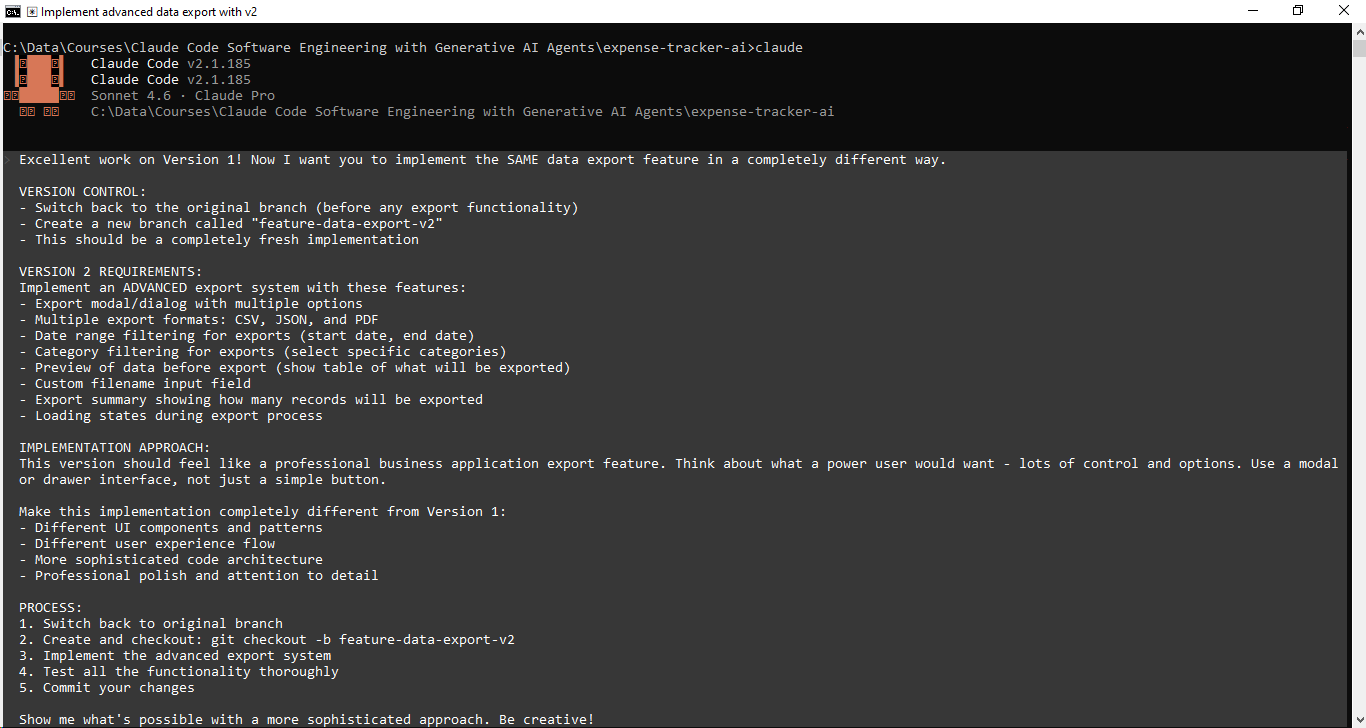
Fantastic job on the first iteration! For our next step, I need you to build the EXACT same data export functionality using an entirely alternative approach.

VERSION CONTROL:

* Roll back to the baseline master branch (prior to adding any export code)
* Spin up a fresh branch named "feature-data-export-v2"
* Treat this as a blank-slate implementation

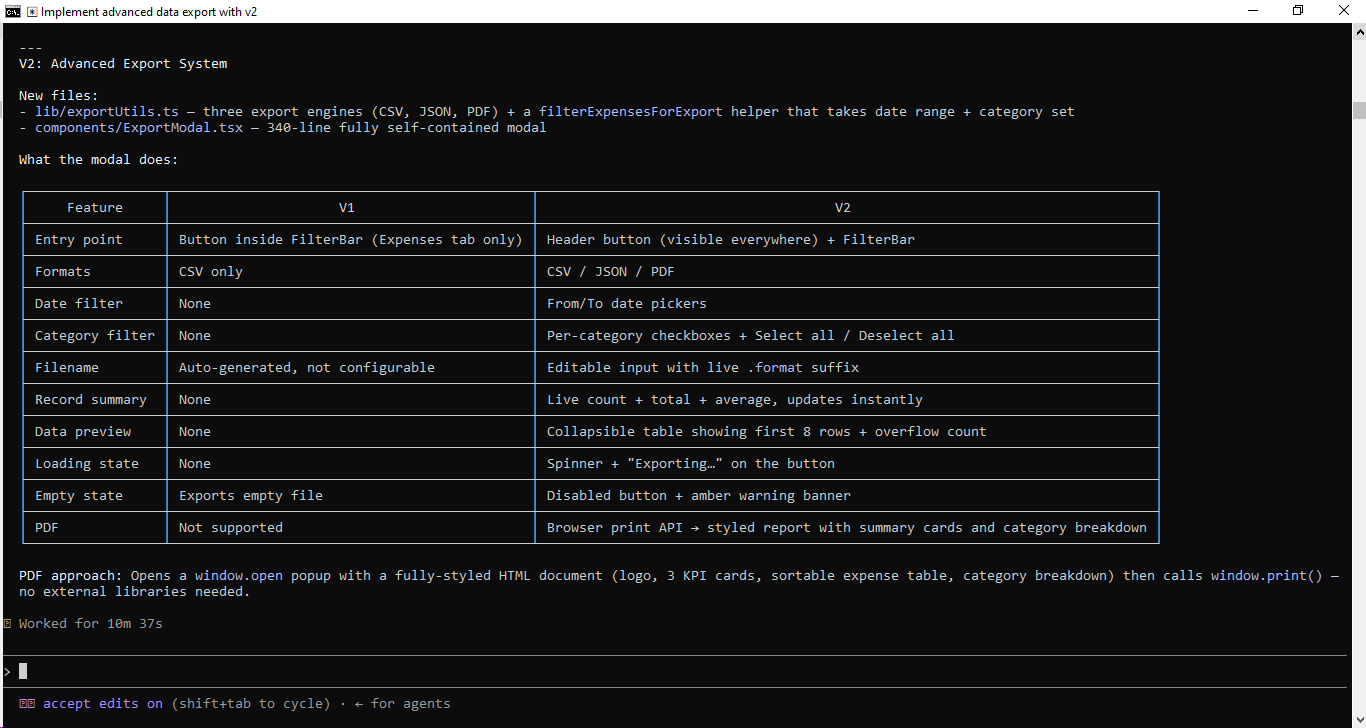
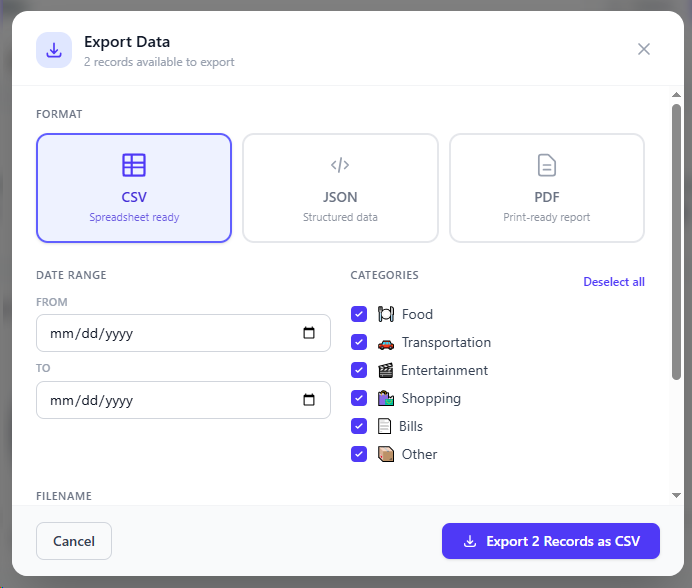
VERSION 2 REQUIREMENTS:

Develop an ENTERPRISE-GRADE export engine featuring:
* A dedicated export configuration panel/overlay
* Support for diverse target formats: CSV, JSON, and PDF
* Temporal constraints (selectable start and end date boundaries)
* Taxonomical filtering (ability to isolate specific data categories)
* An interactive pre-export data preview grid
* A user-defined naming convention input for the output file
* A dynamic data counter indicating total records staged for export
* Visual progress indicators and loading overlays during compilation

IMPLEMENTATION APPROACH:

This iteration must mirror the capabilities of a high-tier SaaS platform's reporting module. Design it with power users in mind—maximizing granularity, configuration, and control. Utilize an overlay component like a modal window or sliding side drawer rather than a basic inline button trigger.

Ensure this architecture shares no overlap with Iteration 1:
* Leverage distinct UI elements and layout paradigms
* Map out an alternative user journey and interaction flow
* Utilize a more robust, modular, and scalable code design
* Focus on pixel-perfect refinement and premium user feedback

PROCESS:

1. Revert to the clean, baseline branch
2. Initialize and switch to the new branch: git checkout -b feature-data-export-v2
3. Construct the comprehensive export suite from scratch
4. Validate all edge cases and filtering mechanics
5. Save and commit your code

Demonstrate the depth of your engineering capabilities with a highly polished, advanced architecture. Push the boundaries!
Part 5: Implementing Version 3 - Cloud Integration
Create Version 3
For our final parallel variation, we will instruct the AI to pivot toward a modern, highly connected, cloud-first approach.
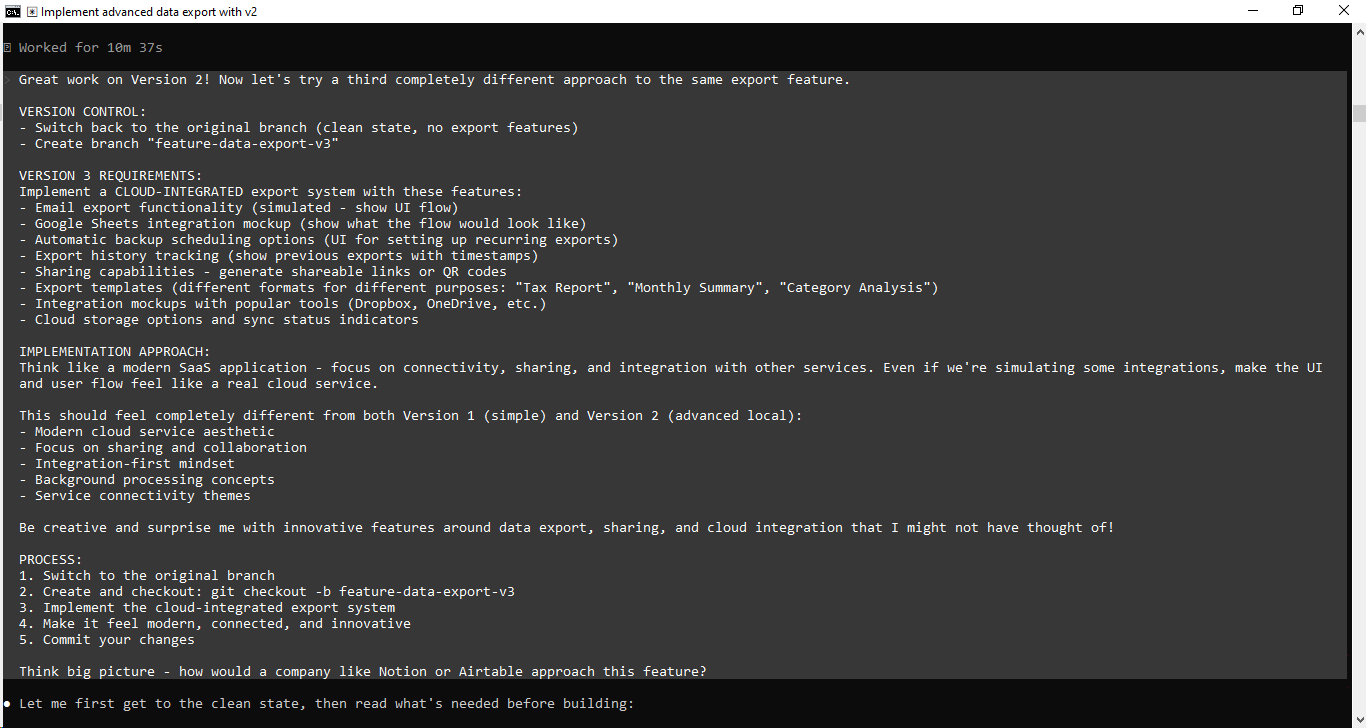
Prompt for Version 3
Plaintext
Fantastic job on Version 2! Let’s pivot to a third, entirely distinct strategy for this same export functionality.

VERSION CONTROL:

* Return to the primary branch (the baseline code, completely free of any export logic)
* Spin up a new branch named feature-data-export-v3

VERSION 3 REQUIREMENTS:

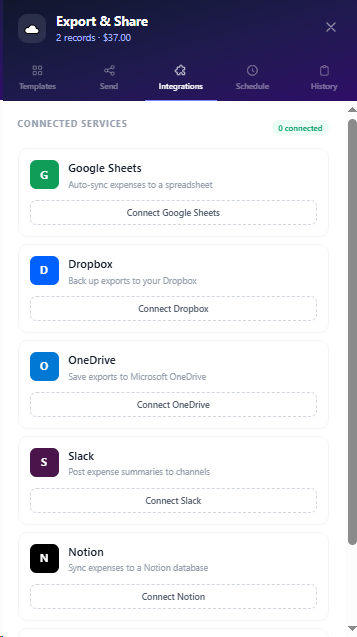
Build a CLOUD-INTEGRATED export framework packed with the following capabilities:

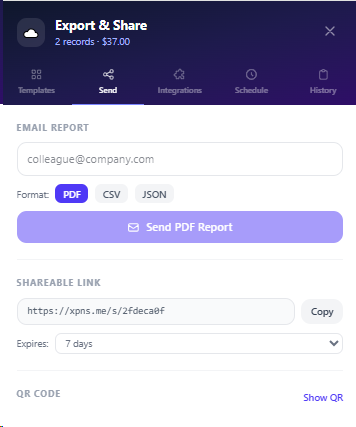
* Email Dispatch Flow: Simulated user interface flow for emailing data directly.
* Google Sheets Connection Mockup: A visual walkthrough of how a user would link their spreadsheet.
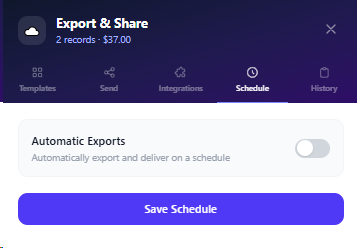
* Automated Backup Planner: A scheduling UI allowing users to configure recurring data extractions.
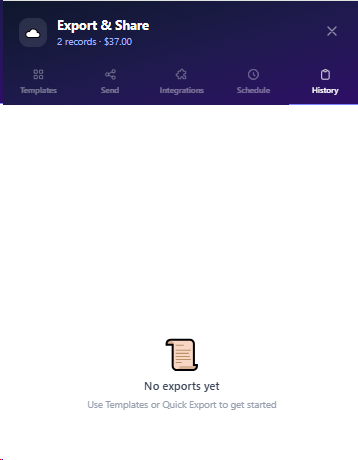
* Historical Audit Log: A timeline component displaying past exports paired with precise timestamps.
* Collaboration & Sharing: Instant generation of secure, shareable web links or scannable QR codes.
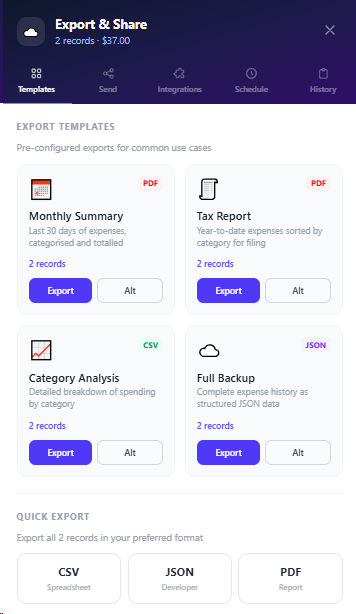
* Preset Export Blueprints: Specialized templates tailored for distinct use cases (e.g., "Tax Report," "Monthly Summary," "Category Analysis").
* Third-Party Storage Gateways: Interactive mockups showcasing connections to platforms like Dropbox or OneDrive.
* Cloud Synchronization HUD: Visual status indicators displaying current cloud storage connectivity and sync health.

IMPLEMENTATION APPROACH:

Adopt the mindset of a cutting-edge SaaS platform. Prioritize seamless connectivity, collaborative sharing, and external ecosystem integrations. Even where backend integrations are simulated, ensure the user experience and interface flow mirror an authentic enterprise cloud application.

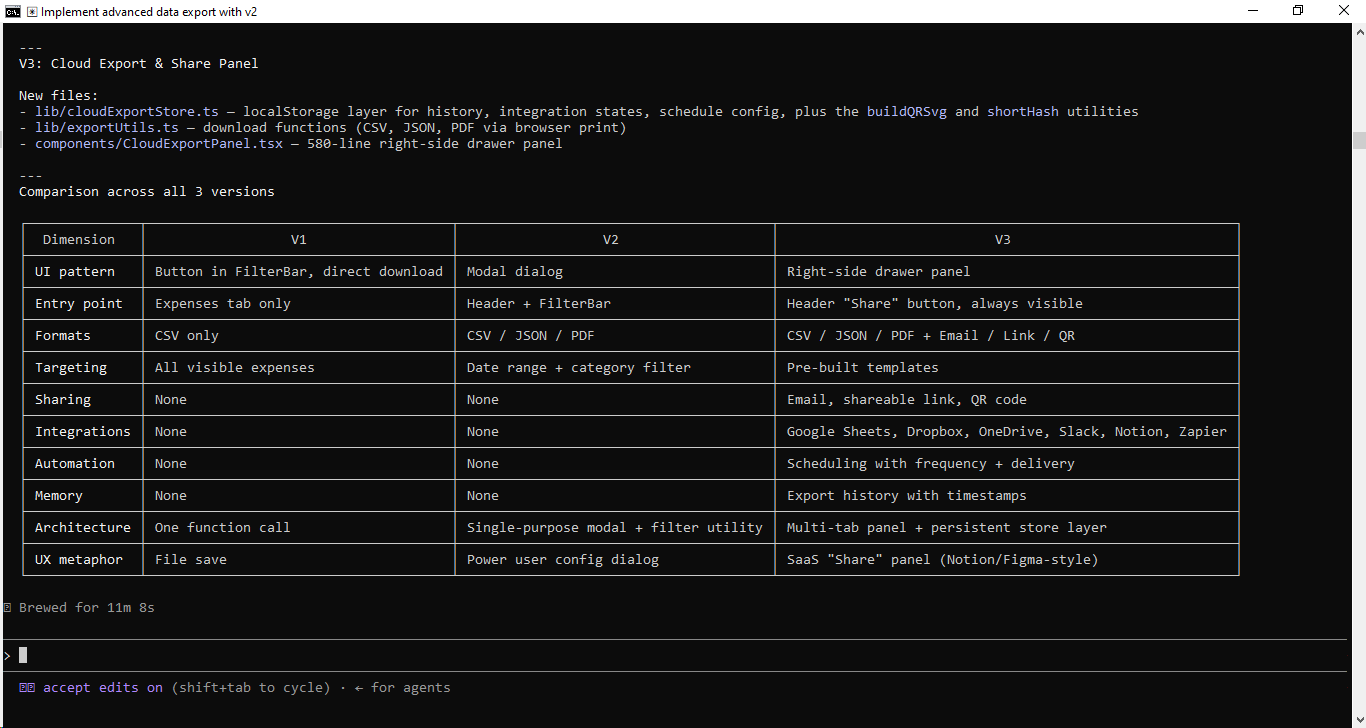
This iteration must stand entirely apart from both Version 1 (bare-bones) and Version 2 (robust local management):
* Sleek, modern web-app visual design
* Heavy emphasis on collaborative features and data portability
* An API-first, integration-heavy architecture style
* Asynchronous background processing cues
* Connected cloud service motifs

Feel free to experiment! Surprise me with forward-thinking features regarding data mobility, remote collaboration, and cloud-native workflows that elevate the standard export experience.

PROCESS:

1. Reset your workspace by switching back to the baseline branch.
2. Initialize and pivot to the new branch: git checkout -b feature-data-export-v3.
3. Develop the cloud-centric data export ecosystem.
4. Elevate the UI to feel hyper-connected, sleek, and forward-looking.
5. Save and commit your progress.

Think enterprise-grade—how would a product leader at Notion or Airtable architect a feature like this?
Part 6: Comparing Your Three Versions
Switch Between Branches
With all three independent prototypes safely preserved inside your repository, you can switch environments dynamically to compare the results:
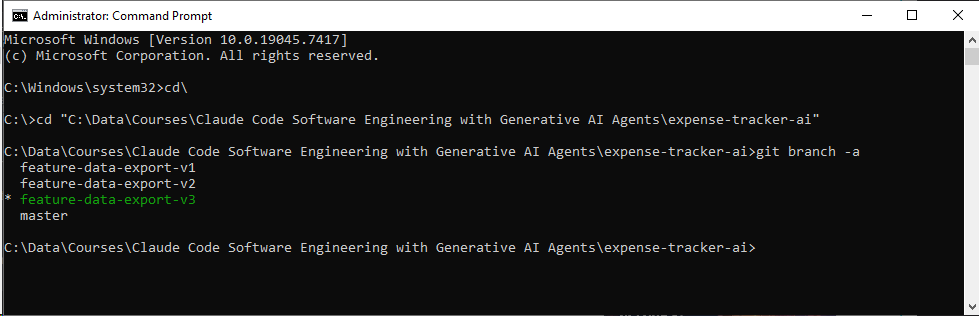
# View your complete list of branches
git branch -a
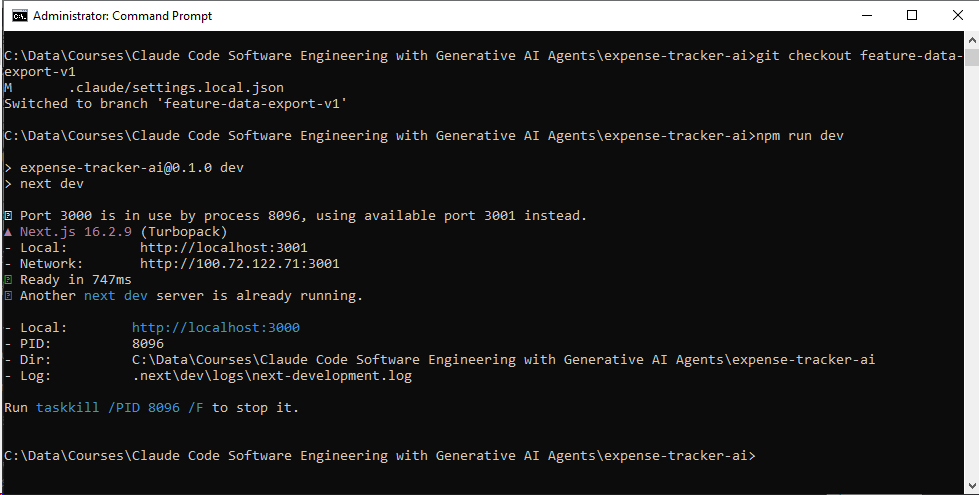
# Switch to the minimal baseline
git checkout feature-data-export-v1
npm run dev
# Evaluate the straightforward CSV mechanism
# Jump to the power-user dashboard
git checkout feature-data-export-v2
npm run dev
# Evaluate the advanced filtering modal and layouts


# Transition to the modern connected prototype
git checkout feature-data-export-v3
npm run dev
# Evaluate the cloud simulation and sharing workflows