
Introduction to Claude Code & Software Engineering with AI Agents
From Developer to CEO: How Claude Code is Transforming Software Engineering
For years, the role of a software developer has been defined by the granular. We worry about syntax, we debug individual functions, and we piece together components line by line. But we are entering a new era. This is the year you transition from a developer worried about individual pieces of code to the CEO of your own software development organization.
This paradigm shift is being driven by Generative AI, but not in the way you might think. While the industry has been buzzing about "vibe coding" and using AI as a simple autocomplete tool, there is a much bigger shift happening. It is centered around a tool that represents one of the most important advances in software engineering of our lifetime: Claude Code by Anthropic.
Resetting Your Expectations
To understand why Claude Code is a massive leap forward—surpassing historical milestones like virtual machines, containers, and modern cloud computing—you have to completely reset your expectations of what software tools can do.
Ask yourself this question: If you suddenly had a team of 1,000 skilled developers available to you, how would you approach your next software project differently?
You wouldn't spend your time writing boilerplate code or setting up repositories. You would focus on vision, architecture, and strategy. That is the exact mentality you need to adopt with Claude Code. It allows you to think, design, and achieve at a completely different scale.
From Prompt to Production in Five Minutes
To demonstrate this power, let’s look at a practical example. Imagine starting a project from absolute scratch with zero existing code. You provide Claude Code with a single, high-level prompt:
"Write a complete Next.js plus Next.UI web application for tracking expenses. When you're done, start it for me to test."
In a traditional development environment, building this would be measured in hours, days, or even weeks. Even with a small team of five developers, just aligning on the tech stack, coordinating tasks, and setting up the environment takes time.
Here is what Claude Code does instead:
Strategic Planning: It immediately acts as its own project manager, building a comprehensive to-do list and mapping out the entire software engineering task.
Autonomous Execution: It initializes the Next.js project, configures Tailwind CSS for styling, creates an expense data model, and designs features like filtering, sorting, and expense statistics.
Permission-Based Actions: It autonomously handles terminal commands, asking for quick confirmations (e.g., executing npx create-next-app@latest) before proceeding.
While Claude Code goes to work, you can literally walk away and make a cup of coffee. By the time you return—under five minutes later—you are presented with a fully functioning, beautiful web application ready for testing.
The Resulting Architecture
Claude Code doesn't just generate a single file or a few isolated functions. It autonomously structures an entire production-ready application repository:
| Generated Components | Description |
| Core Layout & Configuration | All necessary boilerplate, package dependencies, and environment setups. |
| Data Models | Pre-configured tracking for descriptions, amounts, categories, dates, and payment methods. |
| UI Components | Polished, responsive forms and dashboards utilizing Next.UI and Tailwind. |
| State & Analytics | Dynamic components that instantly update expense lists and visual statistics. |
The Power of Perfect Coordination
You might wonder: Couldn't a massive team of 100 human developers build this just as fast?
The reality is no. A team of 100 people requires alignment meetings, encounters communication overhead, and spends time negotiating requirements. Claude Code operates with perfect coordination and near-instantaneous results. It inherently understands the standard requirements of an average expense tracking app without being spoon-fed the details. It bridges the gap between high-level intent and complex execution seamlessly.
The New Toolbox of the Software Engineer
This revolution does not mean software engineers are becoming obsolete; rather, our roles are being dramatically elevated. The skills required to thrive in this new landscape are shifting:
From Coding to Curation: Success will rely less on memorizing syntax and more on system architecture, reviewing autonomous output, and directing AI agents effectively.
Strategic Problem Solving: Developers will focus on defining product vision, security parameters, and unique business logic, leaving the repetitive boilerplate to AI.
Adapting to Scale: The ability to manage massive, rapidly generated codebases will become a core competency.
We are living through one of the most critical transformations in tech history. By learning how to leverage tools like Claude Code, you can achieve engineering feats that will look absolutely unbelievable to traditional developers. The future of software engineering isn't just about writing code faster—it's about leading the build.
1000X Improvement in Software Engineering Productivity with Big Prompts
Here is the transcript converted into a polished, professional article.
Beyond "Vibe Coding": How to Unlock a 1,000x Productivity Boost with AI Agents
Most discussions surrounding generative AI in software development center around a concept known as "Vibe Coding." Developers use AI to quickly churn out functions, files, or small code snippets, keeping themselves tightly in the loop for every single line written.
While this approach is popular, it fundamentally misses the true capability of modern AI agents. By focusing on generating code piece-by-piece, developers are committing a critical mistake: micromanagement.
If you want to truly scale your software engineering capabilities, you must change how you think, how you prompt, and how you work with AI.
The Micromanagement Trap: The 10x Bottleneck
When we interact with generative AI at a function-by-function or file-by-file level, we are treating the AI like an entry-level intern who needs constant hand-holding.
Consider these common, micromanaged prompts:
- “Create components/expense_list.tsx and write functions to display and store data.”
- “In expense_list, add a function to sort the list of expenses by time. At the end of the function, update the state.”
Are these prompts useful? Absolutely. In fact, this hands-on "Vibe Coding" method can easily yield a 5x to 10x improvement in your personal coding productivity.
But it stops there. When you operate this way, you create a rigid micromanagement loop. Every time the AI finishes a minor task, it must return to you for approval. You become the controller, the manager, and ultimately, the bottleneck of the entire software engineering lifecycle.
Imagine if your manager sat over your shoulder and dictated exactly which function to write next, line by line. You would go insane, and it would be a colossal waste of resources. Yet, this is exactly how many engineers treat AI.
The 1,000x Shift: High-Level Abstraction
Throughout the history of computer science, software engineering has evolved by continuously raising the level of abstraction. We moved from assembly language to higher-level languages, and we don't micromanage our compilers line-by-line—we tell them to build the project and report back.
AI agents like Cloud Code represent the next massive leap in abstraction. To unlock a 1,000x productivity improvement, you must stop thinking about code generation and start thinking about software engineering at scale.
Instead of dictating implementation details, you prompt the AI with big tasks, challenges, and user perspectives.
The Power of Macro-Prompting
Look at what happens when you replace micromanagement with a high-level, strategic prompt:
The Macro-Prompt: "Act like the typical user of this application, then create different ways of sorting, filtering, and displaying the expenses that are incredibly powerful and useful."
When given an open-ended, strategic objective like this, a sophisticated AI agent doesn't just write code—it dreams up the requirements. It simulates the customer’s perspective, anticipates what they will need and feel, outlines a cohesive development roadmap, and spins up a new Git feature branch to execute the work autonomously.
What Autonomy Looks Like in Practice
When you step away from the keyboard and allow an AI agent to operate autonomously, the results are staggering. In a matter of minutes—while the human engineer is free to focus on architecture, strategy, and critical thinking—the AI can independently design and implement an entire suite of features:
- Advanced Filtering: Automatically building out custom date-range pickers, calendar inputs, and multi-select category filters without being explicitly told to do so.
- Comprehensive Analytics Dashboards: Tracking daily/monthly trends, rendering payment method distributions, and building visual data charts.
- Data Portability: Adding export functionality to CSV, JSON, or text reports.
- UX/UI Enhancements: Optimizing layouts for responsiveness and reorganizing filter controls for better usability.
[Traditional Vibe Coding] -> Developer prompts for
Function A -> AI builds Function A -> Developer reviews -> Developer
prompts for Function B (5x - 10x gain)
 [Agentic Software Engineering] -> Developer defines User
Goal & Strategy -> AI Agent brainstorms, branches, builds, and tests
entire feature suites (1,000x gain)
Don't Be the Bottleneck
The scalability of AI is the single most critical innovation of our time. If your development workflow requires hundreds of minor iterations where you must constantly insert yourself to dictate the next step, you are throttling the technology.
Your role as a software engineer is shifting. You are no longer just a writer of code; you are an innovator, an architect, and an entrepreneur. Your job is to drive the critical thinking, guide the high-level architecture, and understand customer problems.
Step back from the micro-prompts. Let go of the need to oversee every single line of code. By shifting your mindset from code micromanager to strategic director, you allow AI agents to scale infinitely—achieving truly unprecedented orders of magnitude in both the rate and quality of software production.
Launching Claude Code: Guide to Building Your First Application
Prerequisites
Before diving in, ensure you have the following setup. If you get stuck on any of these requirements, you can open Claude and copy-paste the provided helper prompts for step-by-step guidance.
- Terminal & Command Line Basics
Claude Helper Prompt: "Teach me how to use the command line on my system. Ask me one question at a time or tell me one step at a time what to do. What is the first question or step?"
- Node.js & npm Installed (Download via Node.js Docs)
Claude Helper Prompt: "Help me install NodeJS and NPM. Ask me one question at a time or tell me one step at a time what to do. What is the first question or step?"
- Git Installed and Configured
Claude Helper Prompt: "Help me install the Git CLI. Ask me one question at a time or tell me one step at a time what to do. What is the first question or step?"
Part 1: Installing and Setting Up Claude Code
Step 1: Installation
- Request Access: Register for a subscription that includes Claude Code or secure an API key for pay-as-you-go usage at claude.ai/code.
- Install Globally: Once access is granted, run the following command in your terminal:
npm install -g @anthropic-ai/claude-code
- Verify Setup: Ensure it installed correctly by checking the version:
claude --version
Step 2: Initial Launch
Create a dedicated workspace and fire up the tool:
mkdir expense-tracker-ai
cd expense-tracker-ai
claude
Note: On your first launch, Claude will guide you through authentication and initial permission configurations.
Part 2: Navigating the Interface
Key Interface Elements
When Claude Code is running, you will interact with:
- Prompt Input: The main field where you enter your project directions.
- Tool Permission Requests: Safety checks where Claude asks for your approval before executing terminal actions.
- Real-Time File Operations: A live view of files being generated, modified, or structured.
- Task Updates: A live checklist explaining exactly what Claude is working on in the moment.
Core Slash Commands
Type / at any time to view all available commands, including these essentials:
- /init: Generates a CLAUDE.md file to establish project guidelines (for pre-existing projects).
- /permissions: Adjust and manage tool execution rights.
- /clear: Wipes the active chat history.
- /help: Displays a comprehensive menu of available commands.
Part 3: Deploying "The Big Prompt" (Building an Expense Tracker)
Step 1: Initialize the Project via Macro-Prompting
Rather than micro-managing Claude with small, piecemeal requests like "write this function" or "build that component," you will feed it a single comprehensive prompt outlining your entire application vision. Shifting to this macro-prompting style is how you leverage AI as an autonomous digital worker rather than a simple coding assistant.
I want you to create a modern, professional NextJS project management and task tracking application. Here's my vision:

APPLICATION OVERVIEW:

Build a complete project and task tracking web app that helps users manage their daily workflows and team productivity. The app should feel modern, intuitive, and professional.

CORE FEATURES:

* Add tasks with title, due date, priority level, status, and detailed description
* View tasks in a clean, organized Kanban board or list view
* Filter and sort tasks by due date, priority, and current status
* Dashboard with project progress summaries and basic completion analytics
* Statuses: To Do, In Progress, Under Review, Blocked, Completed
* Data persistence using localStorage for this demo

TECHNICAL REQUIREMENTS:

* NextJS 14 with App Router
* TypeScript for type safety
* Tailwind CSS for styling with a modern, clean design
* Responsive design that works on desktop and mobile
* Use React hooks for state management
* Form validation for task inputs
* Date picker for task due dates
* Clear visual indicators for priority levels (e.g., Low, Medium, High)

DESIGN REQUIREMENTS:

* Clean, modern interface with a professional color scheme
* Intuitive navigation and user experience
* Visual feedback for user actions (e.g., drag-and-drop or status updates)
* Loading states and error handling
* Mobile-responsive design

SPECIFIC FUNCTIONALITY:

* Task creation form with validation
* Task board/list with search and advanced filter capabilities
* Summary cards showing total tasks, completed tasks, upcoming deadlines, and roadblocks
* Basic charts or visual representations of team velocity or task distribution
* Export functionality (at least CSV or JSON)
* Delete and edit existing tasks or shift their status

Please create this as a complete, production-ready application. Set up the project structure, implement all features, and make sure everything works together seamlessly. Focus on creating something that looks professional and that I could actually use to track my projects.

When you're done, provide instructions on how to run the application and test all features.
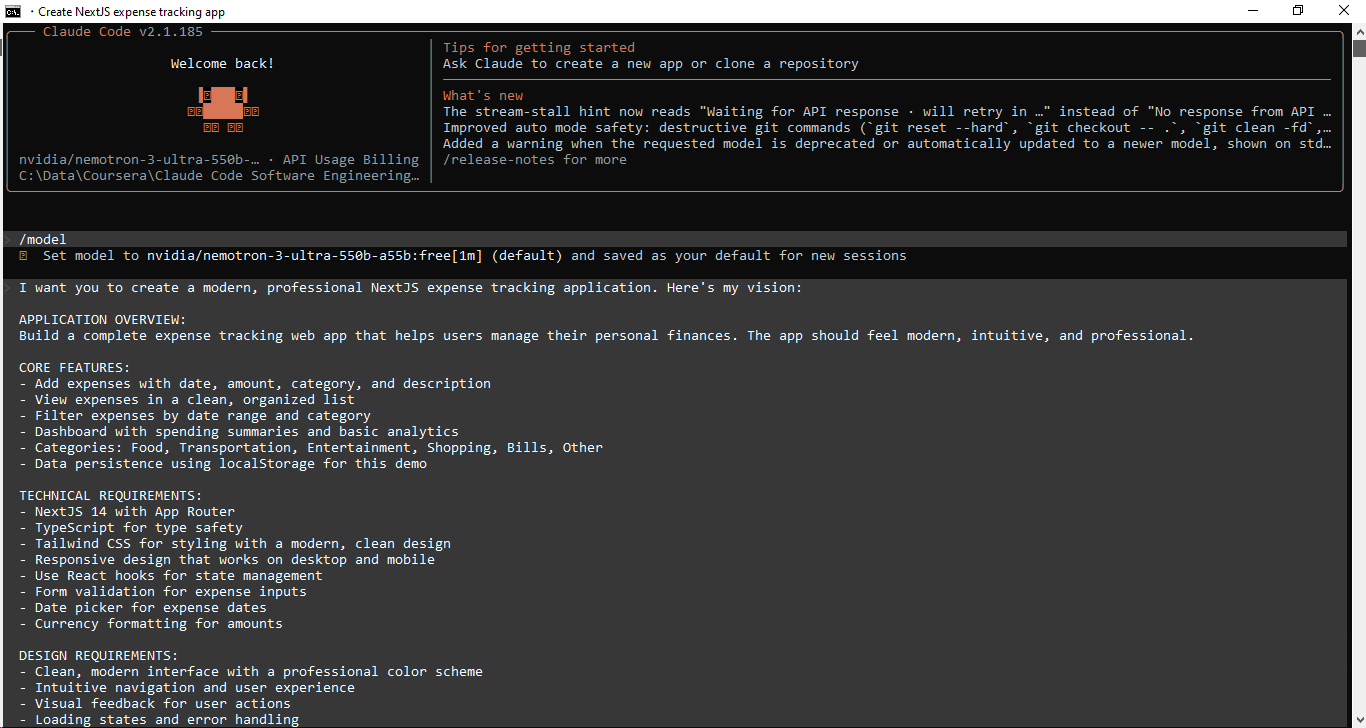
Step 2: Watch Claude Build
Once you submit your comprehensive prompt, Claude will autonomously execute the workflow:
- Formulate a Blueprint: It maps out its development strategy.
- Scaffold the Architecture: It spins up the Next.js framework integrated with TypeScript and Tailwind CSS.
- Develop Components: It creates individual React building blocks.
- Wire Up Functionality: It hooks up all requested application logic.
- Verify & Quality Check: It ensures the codebase integrates smoothly.
💡 Tip: If Claude wraps up without verifying its work, prompt it: "Please compile the project and ensure the application runs without errors."
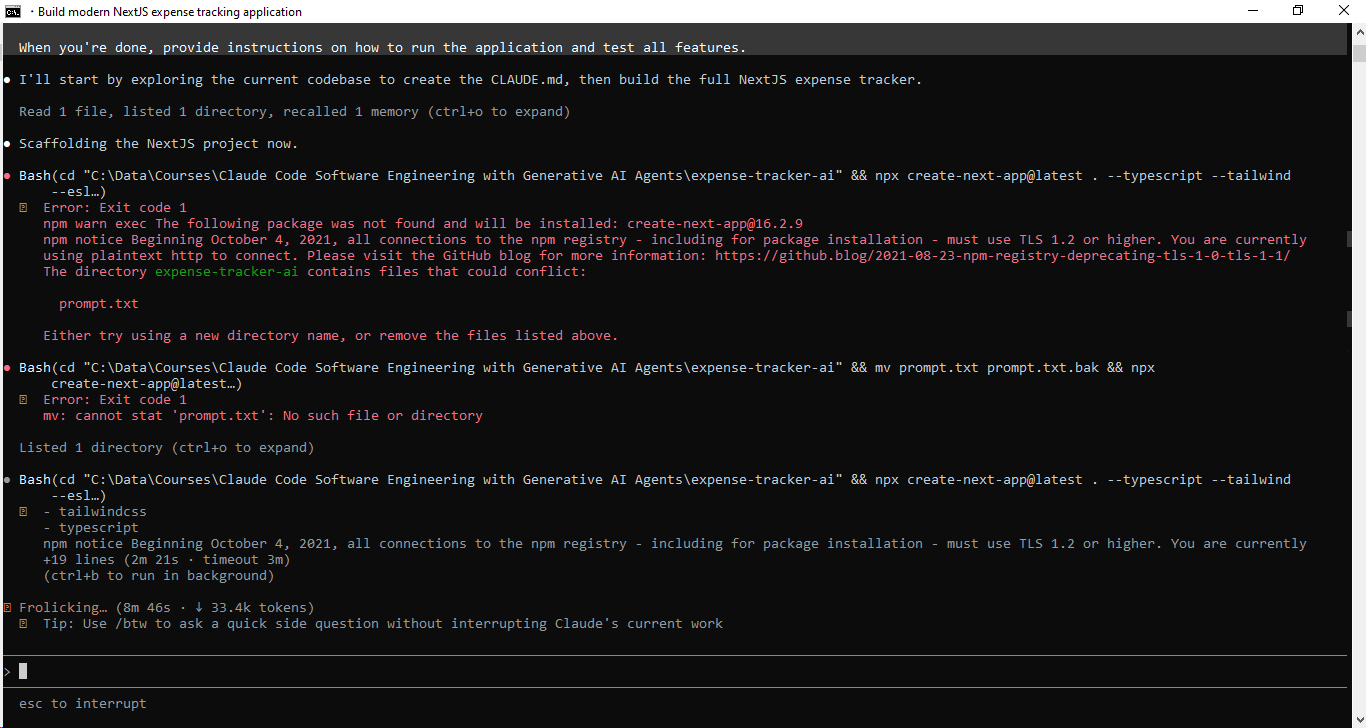
Step 3: Managing Permissions
During development, Claude will request authorization to:
- Run environment-level terminal commands (e.g., npm create-next-app, npm install).
- Generate, read, and modify codebase files.
- Install project dependencies.
Always review these system requests before granting approval.
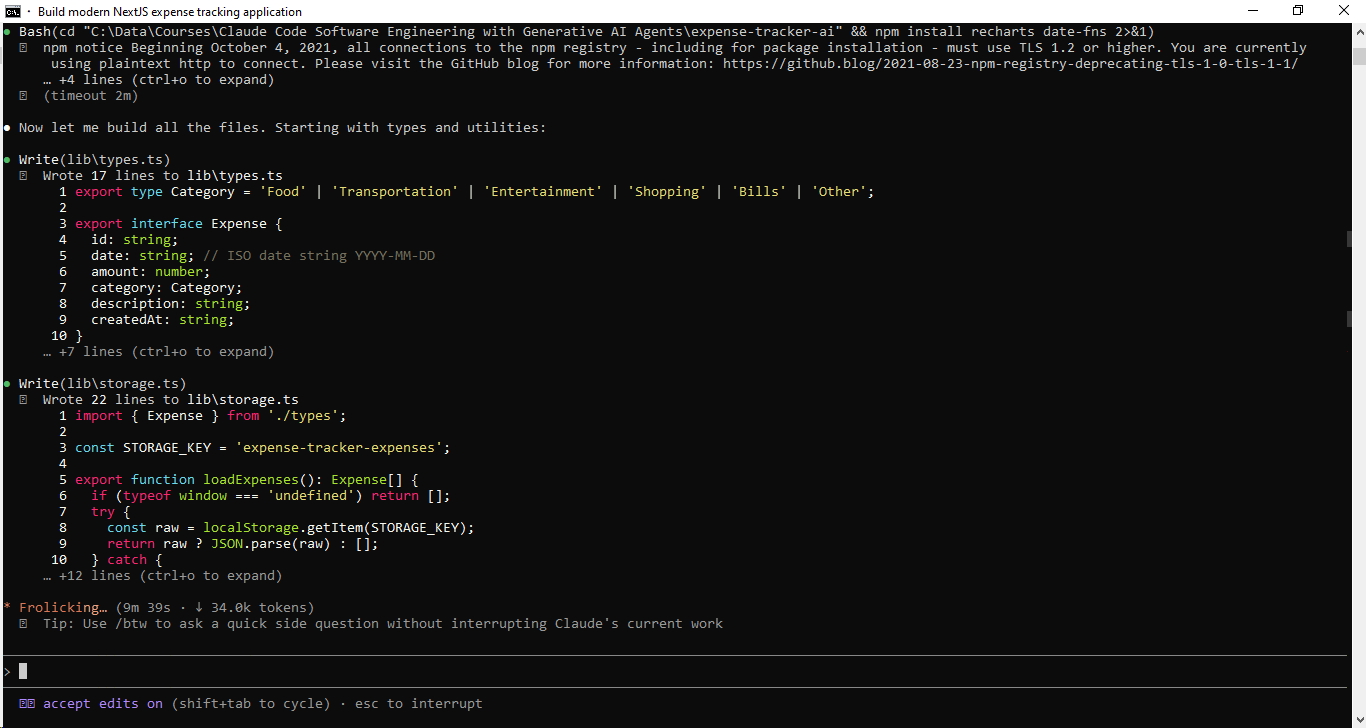
Step 4: Reviewing the Architecture
As the AI builds, take note of how it handles the software engineering lifecycle:
- File Structure: How logically it segments directories.
- Component Architecture: Its approach to breaking the UI down into reusable parts.
- State Management: How efficiently data flows across components.
- Styling Approach: How Tailwind utility classes are leveraged for the UI design.
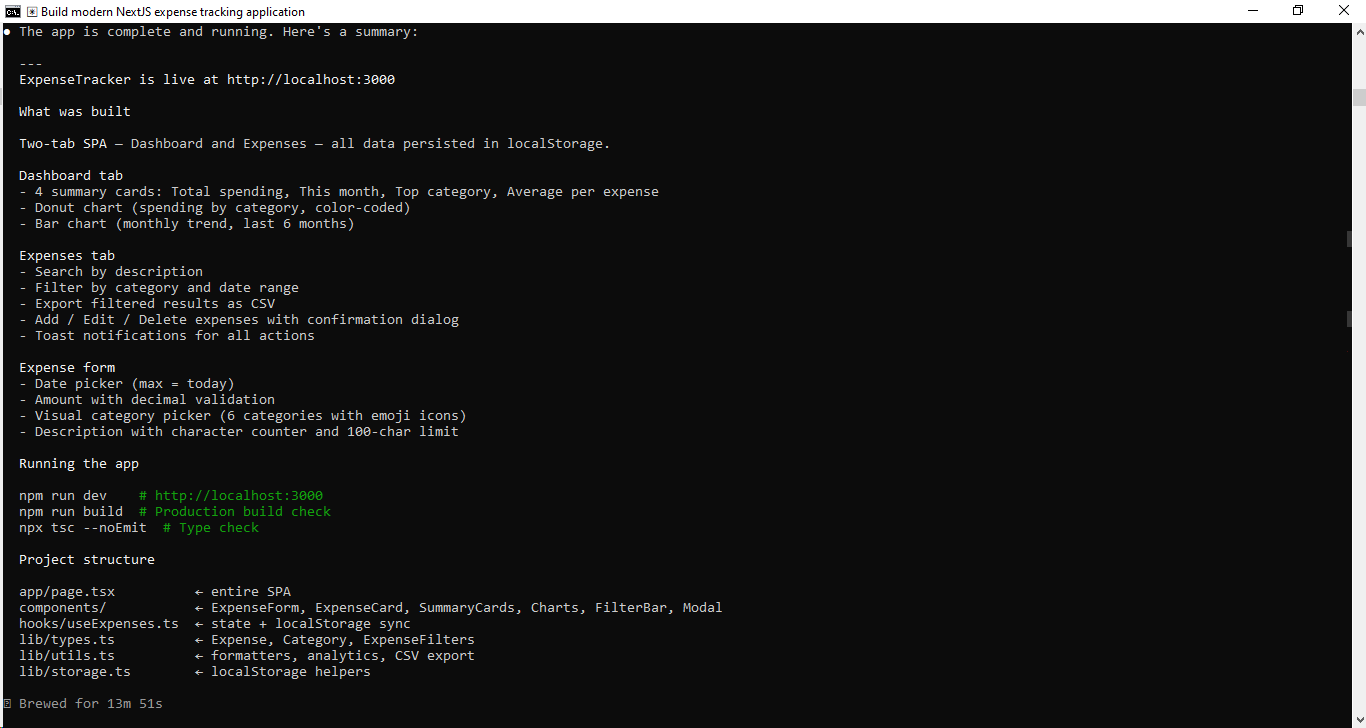
Step 5: Testing Your Application
When Claude completes the build, boot up your local development server with:
Bash
npm run dev
Open your browser and navigate to http://localhost:3000 to test out your new app.
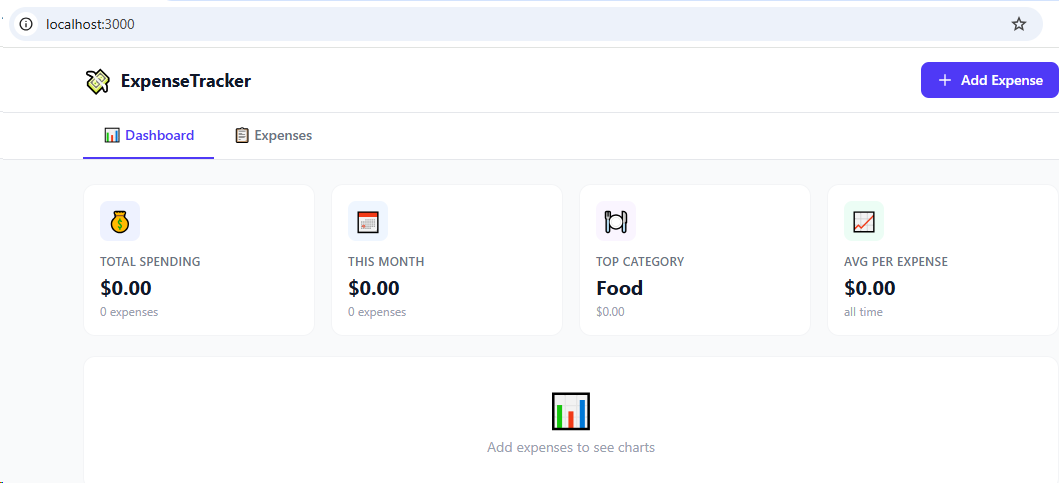
Shutting Down: Once you are finished testing, cleanly close out the process in your terminal by pressing Ctrl + C. This prevents the application from running in the background and keeping port 3000 occupied.