
Can AI Judge Code Quality?
Context, Rubrics, and the Path to Trusting Automated Engineering
If we are ever going to truly step back, let AI-driven engineering scale, and fully trust autonomous agents, we have to establish one fundamental truth: the AI must be able to recognize high-quality code. For human developers, the ability to write great software is directly tied to the ability to evaluate it. We look at a script and naturally spot edge cases, identify refactoring opportunities, and see where it falls short of standards. To bridge the gap between AI generation and true developer trust, we need to prove that AI can critique code with the same nuance.
Recent experiments with LLMs show that not only can AI build the rubric for code quality, but it can also dynamically shift its evaluations based on human context.
Part 1: Building the Rubric
To test this capability, a simple prompt was issued to an LLM:
“Write a 20-line Python function that can store data it receives as JSON. Then, create a table to score the coding solutions across a number of important dimensions.”
The AI didn't just generate the code; it successfully established a comprehensive, weighted evaluation matrix out of 5 points. The dimensions it came up with included:
Functionality & Performance
Error Handling & Security
Flexibility & Maintainability
Documentation & Best Practices
Line Efficiency
Applying the Rubric
When fed two different code solutions (Solution A and Solution B) and asked to evaluate them against its own rubric, the AI didn't just spit out arbitrary numbers. It provided distinct human-level rationale for its choices:
Error Handling (Winner: Solution B): Features comprehensive try-except blocks and meaningful error feedback.
Code Quality (Winner: Solution B): Includes clean structure and explicit type hints.
Flexibility (Winner: Solution A): Offers optional parameters like a timestamp feature and a default filename.
Evaluating "flexibility" isn't something a traditional compiler or formal syntax checker can do; it requires a higher-level judgment. The AI successfully identified that Solution A’s optional parameters made it more adaptable, ultimately declaring Solution B the overall winner due to its superior error handling.
Part 2: Context is Everything
While the initial evaluation was impressive, code quality cannot truly be judged in isolation. "Good error handling" or "clean structure" depends entirely on where and how the code will be used.
To test the AI’s depth of understanding, a drastic shift in project constraints was introduced mid-conversation:
“By the way, this is for a system that does historical logging and we need to make sure that we capture everything. Project best practices: Always throw exceptions, and timing is critical.”
The Results of the Context Shift
The AI immediately recognized the ramifications of this new data, stating: "This context significantly changes the evaluation." It completely flipped its scoring:
Error Handling: Solution A jumped to a 5/5, while Solution B plummeted to a 1/5. Why? Because Solution B was caught trapping and swallowing exceptions internally, whereas the new project guidelines explicitly required exceptions to bubble up.
Flexibility: Solution A was praised further because its optional timestamp feature suddenly became a critical requirement for historical logging.
[Initial Evaluation] --------> Winner: Solution B (Better internal try-catch)
[Injected Context] -----------> Winner: Solution A (Throws exceptions, has timestamps)
Why This Matters: Closing the Consistency Gap
This experiment proves that given sufficient context, an AI can accurately critique and score code across dimensions that are uniquely relevant to your project.
This has massive implications for the future of software development:
Self-Evaluation & Refactoring: If an AI can judge code against a rigid standard, it can be instructed to self-evaluate. It can write a draft, critique its own work against your project's custom rubric, and iteratively refactor the code before a human developer ever sees it.
Solving the Consistency Problem: One of the biggest hurdles with AI-generated code is variance—sometimes it follows best practices, and sometimes it cuts corners. By embedding a strict evaluation rubric directly into the AI's prompt boundary, we ensure it maintains rigorous standards every single time.
Ultimately, building trust in autonomous code agents isn't just about teaching them how to write; it's about teaching them how to judge. Once the AI masterfully introspects its own output, the gap between human expectations and machine execution will finally close.
Evaluating Code and Feature Implementations with Artificial Intelligence
Prerequisites
- Before beginning this guide, ensure you have completed the foundational reading on the software engineering benefits of using advanced AI coding tools, available on the official blog post here .
- You should also have three distinct implementations of a data export feature set up in separate Git branches, explained in detail in the blog post here.
- Fundamental understanding of code evaluation practices.
- Working installation of your AI developer assistant.
Part 1: Why Code Evaluation Matters for AI Development
The Evaluation Challenge
When utilizing artificial intelligence as an engineering force, you will frequently find yourself with multiple viable, working solutions to a single problem. This differs substantially from traditional software development, where constraints typically mean only a single architecture or approach is fully realized. Because AI can generate functional variations at unprecedented speeds, it opens up the opportunity to explore various paths. However, this velocity introduces a distinct challenge: establishing a structured, systematic method to evaluate and contrast these diverse implementations.
Comparing Traditional and AI-Driven Development Evaluations
In a traditional development environment, software engineers typically build a single solution and evaluate it against theoretical alternatives. Decisions are largely guided by professional experience, architectural intuition, and past patterns. Because shifting directions mid-project incurs a high cost, the ability to test entirely different tangible approaches side by side is heavily constrained.
In an AI-centric development model, the paradigm shifts to evaluating multiple fully realized implementations simultaneously. Instead of comparing a working build against abstract concepts, developers can evaluate real, completed code blocks and contrast actual user experiences concurrently. This unlocks the ability to make highly objective, data-driven decisions regarding final software architecture.
What We Are Evaluating
This walkthrough focuses on the systematic assessment of three distinct implementations of an expense tracking feature across several key engineering dimensions.
Part 2: Setting Up for Systematic Evaluation
Step 1: Verify Your Implementations
To begin, confirm that the project environment contains the necessary branches generated during your iterative development phase. Navigate to your project directory and list all available branches:
cd expense-tracker-ai
git branch -a
Your environment should display the following targeted development tracks:
main: The stable core application.
feature-data-export-v1: A streamlined, single-button CSV export option.
feature-data-export-v2: An advanced export system featuring multiple file formats and data filtering parameters.
feature-data-export-v3: A cloud-integrated solution focused on collaborative file sharing and remote access.
Step 2: Launch Your AI Developer Assistant
Initiate your command-line AI coding assistant to begin the active review session by executing the startup command:
claude
Step 3: Create and Execute the Evaluation
Instruct the AI assistant to perform a comprehensive examination of each implementation. The assistant will handle the process of switching between the specified Git branches to inspect code architecture, user interface design, and underlying technical methodologies. This structured code review uncovers not just the operational output of each version, but the mechanics, design choices, and trade-offs inherent to each approach.
The findings from this analysis will be compiled into a dedicated documentation file outlining the technical structure, file organization, external dependencies, and design patterns used in each variant. This document serves as the structural foundation for deciding whether to adopt one specific approach or merge the strongest elements of each into a hybrid solution.
Use the following instructional prompt to direct the AI assistant:
I have three distinct implementations of a data export feature spread across three Git branches within my expense tracking application. I need to establish a structured evaluation methodology to thoroughly contrast and compare them.

BACKGROUND:

* feature-data-export-v1: Basic CSV export utilizing a single-button user flow.
* feature-data-export-v2: Enhanced export supporting multiple file types and custom data filtering.
* feature-data-export-v3: Cloud-based export featuring remote sharing and collaborative tools.

Please conduct a methodical analysis of these three feature implementations by checking out each branch sequentially and reviewing the codebase, system architecture, and technical execution.

ANALYSIS PROCESS:

For each branch (v1, v2, v3), please execute the following steps:
1. Checkout the specific branch.
2. Inspect every newly created or altered file.
3. Evaluate the structural architecture and design patterns employed.
4. Examine the component hierarchy and structural breakdown.
5. Inspect the user interface layout and implementation.
6. Verify how edge cases and exceptions are managed.
7. Evaluate the chosen technical methodology and integrated external libraries.

DOCUMENTATION:

Generate a markdown file named "code-analysis.md" detailing your assessments for each variant:

For Each Version, Document:

* The list of added or modified files.
* An overview of the structural code architecture and organization.
* Principal components along with their respective functional roles.
* Utilized libraries, packages, and external dependencies.
* Adopted design patterns and coding strategies.
* A technical assessment of code complexity.
* Strategy used for error management and exceptions.
* Data security and vulnerability considerations.
* Runtime performance and resource implications.
* Long-term maintainability and expansion capability.

Technical Deep Dive:

* What are the underlying mechanics of the export routine?
* What programming technique or pipeline handles file generation?
* How are user inputs and triggers captured and processed?
* Which state management design models are enforced?
* What mechanisms isolate and resolve boundary conditions or edge cases?

Please ensure your review is highly technical and comprehensive, as these insights will directly guide our final decision on whether to adopt a single strategy or merge the best aspects of all three.
What to Look For After the Initial AI Analysis
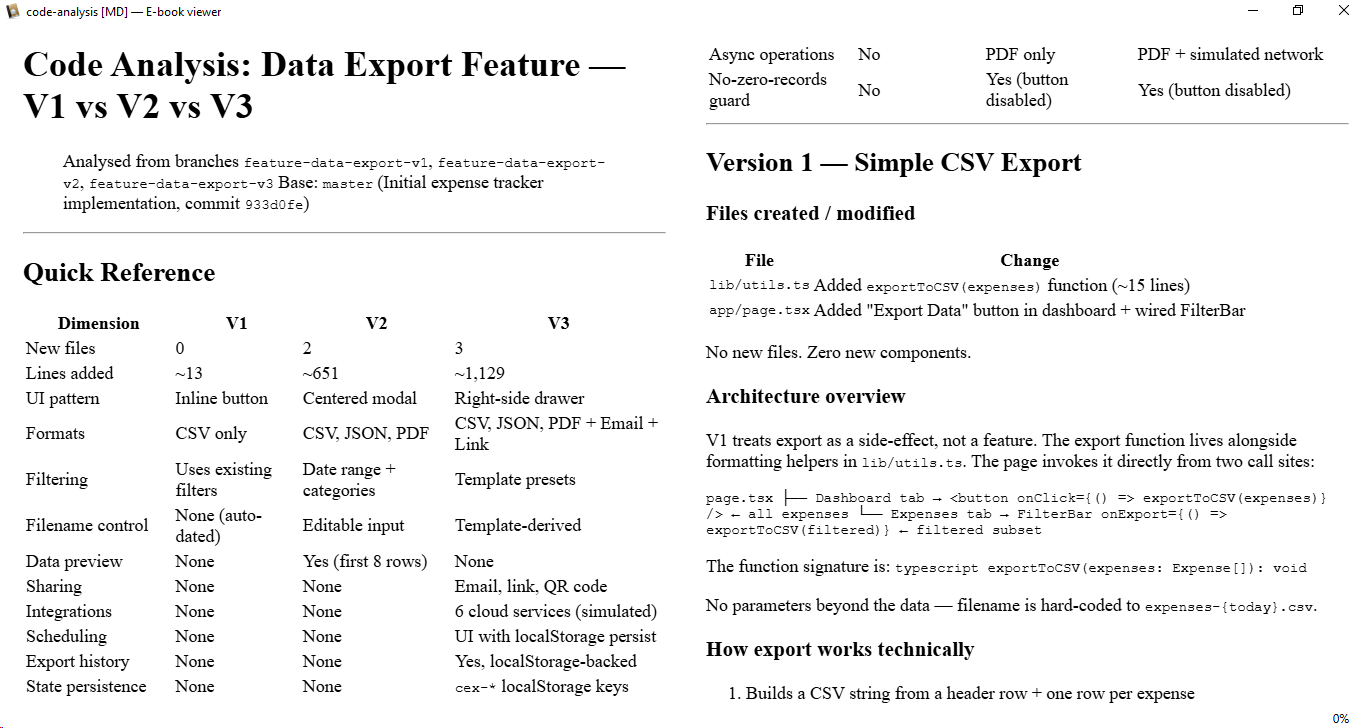
Once the AI assistant completes its evaluation, review the newly generated file titled code-analysis.md. This document provides a high-level overview of the architectural variances among the three solutions. Pay close attention to macro-level divergences in structural organization, codebase complexity, and core design philosophy. This review helps confirm whether the generated options represent genuinely distinct solutions or are simply minor variations of the same underlying method.
Building Your Personal Evaluation Framework
While the default structural evaluation provided by the AI is thorough, projects often require adherence to distinct organizational standards, team protocols, or compliance rules. Establishing a tailored evaluation template ensures that future comparisons focus directly on your priority metrics. Identify the specific standards that matter most to your application architecture and formalize them in a custom template file named my-evaluation-template.md. You can then direct the AI assistant to read and enforce this personalized framework whenever it evaluates multi-version feature branches.